How to Draw a Believable Hug: A Guide to Realistic Couple Poses
One of the most satisfying things you can draw is your yumeship in a cute hug. But… this can also be one of the hardest poses to draw.
Even with over 20 years of drawing experience, the challenge of getting a hug just right sometimes makes me want to throw my stylus across the room.
There’s something tricky about trying to figure out where one character ends, and the other begins, without it looking like a messy blob of arms and legs. Even after taking paid commissions for years, getting two bodies to look like they are actually touching and interacting within personal space is a challenge.
Here, we’ll see how PoseMyArt can help you overcome the challenge of drawing a believable hug.
The Nightmare of Shared Space
When two people embrace, they aren’t just standing next to each other. They’re sharing weight, leaning, and even pressing against one another. It’s incredibly easy to make a mistake.
You can make a drawing without a reference. It can look cute or romantic at first, but then, maybe even after you’ve gotten to the coloring stage, you suddenly realize that something is off.
An arm, from the way it’s positioned, turns out to be too long. One character is actually much bigger than they’re supposed to be. That elbow is poking out at an awkward angle.
Getting that far and putting in all that effort only to realize that something looks off and awkward can be one of the most frustrating things ever. Using PoseMyArt gives you a way to calculate that “shared space,” so you don’t get stuck, and you can draw using a reliable reference.
Use Pre-Made Scenes as Your Blueprint
Instead of starting from “point zero” and getting frustrated, you can use the pre-made poses or pre-made scenes in PoseMyArt. You can load a scene where two models are already posed for a hug, shaving even more time and effort off from finding the perfect reference.
This gives you a perfect 3D blueprint for size, scale, and exactly how those bodies should interact in space. You can see how the different models, anime or realistic, overlap. This takes all the guesswork out of your initial sketch.
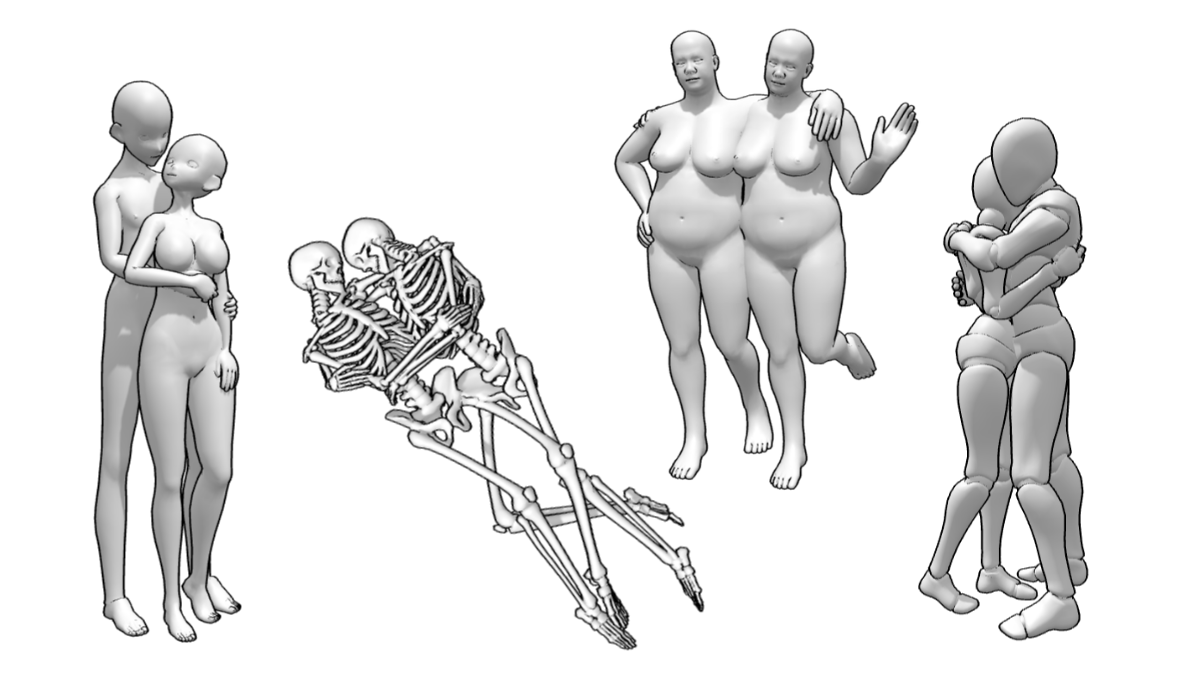
Here are some samples directly from the PoseMyArt app, just open up Premade Scenes and search for the keyword “hug”. Notice that these premade scenes are made with different preset model types like Anime, Skeleton, Stocky, and Bot.
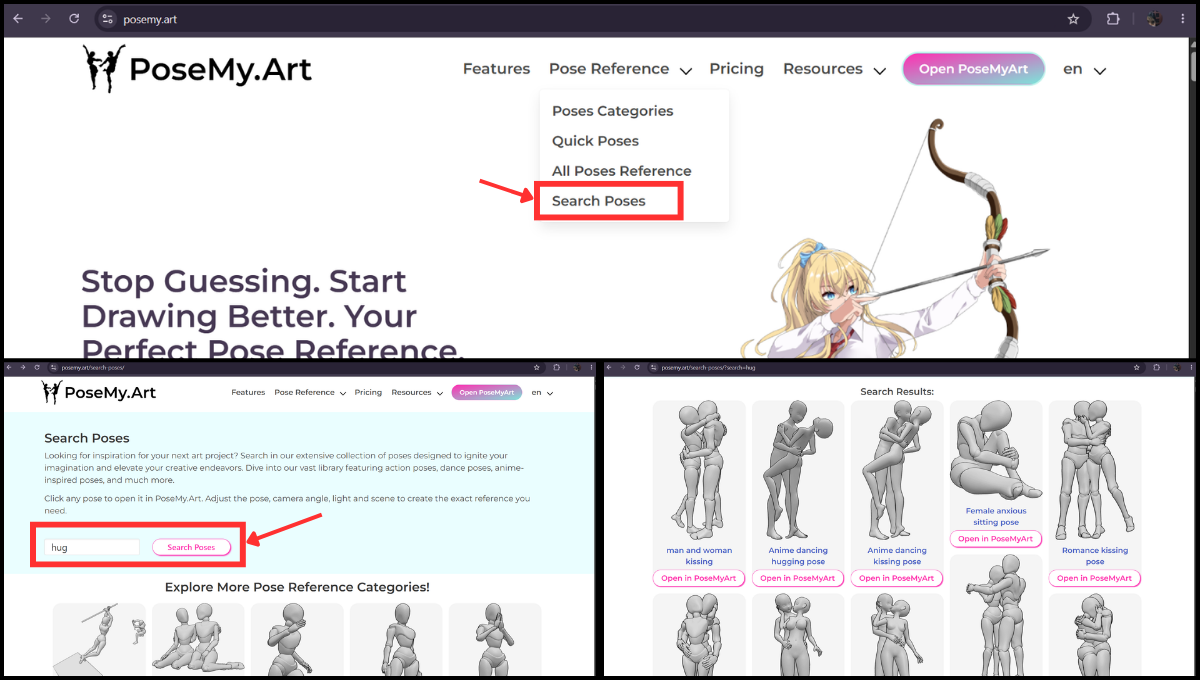
Another way you can look for hugging poses is through the PoseMyArt website with the Search Poses page. When you search for “hug”, you can preview the poses before opening them up in the app.
Good References Can Help Level Up Your Game
As an artist, anatomy is one of the most challenging aspects to truly grasp. You have to build and sharpen your understanding of it with practice and study so you can draw it better.
Here’s what you can do on PoseMyArt to help with your anatomy studies.
Check the Compression
Observe how the models press against each other to understand body volume and chest-to-chest contact. Note how your model’s arms wrap around and pull at another body.
PoseMyArt Tip
Use the Color feature to assign your model a color. This can make it easier to distinguish who owns which arm or chest.
Remember, bodies are made of soft fat and muscle and a little overlap is acceptable when pulling tight against each other. But don’t forget the solid bones of a person’s skeleton, too much overlap can be anatomically incorrect.
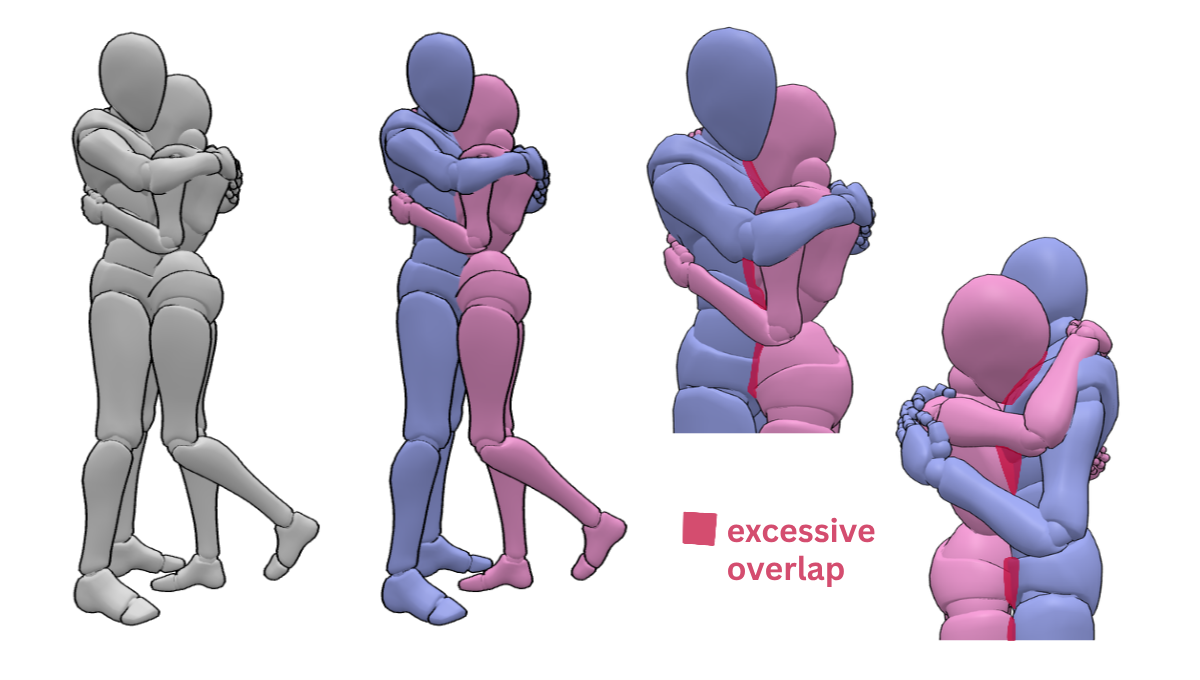
We can see that the chest and pelvis of both models sink too much into one another. Remember the female will likely have a nose and she is burying her face much too deeply into the male’s chest.
By pulling the models slightly apart and making the necessary adjustments to arms and head tilt, the pose now looks more correct. The spaces (green shaded areas) are small, but give you a little allowance for your characters’ clothes and accessories.
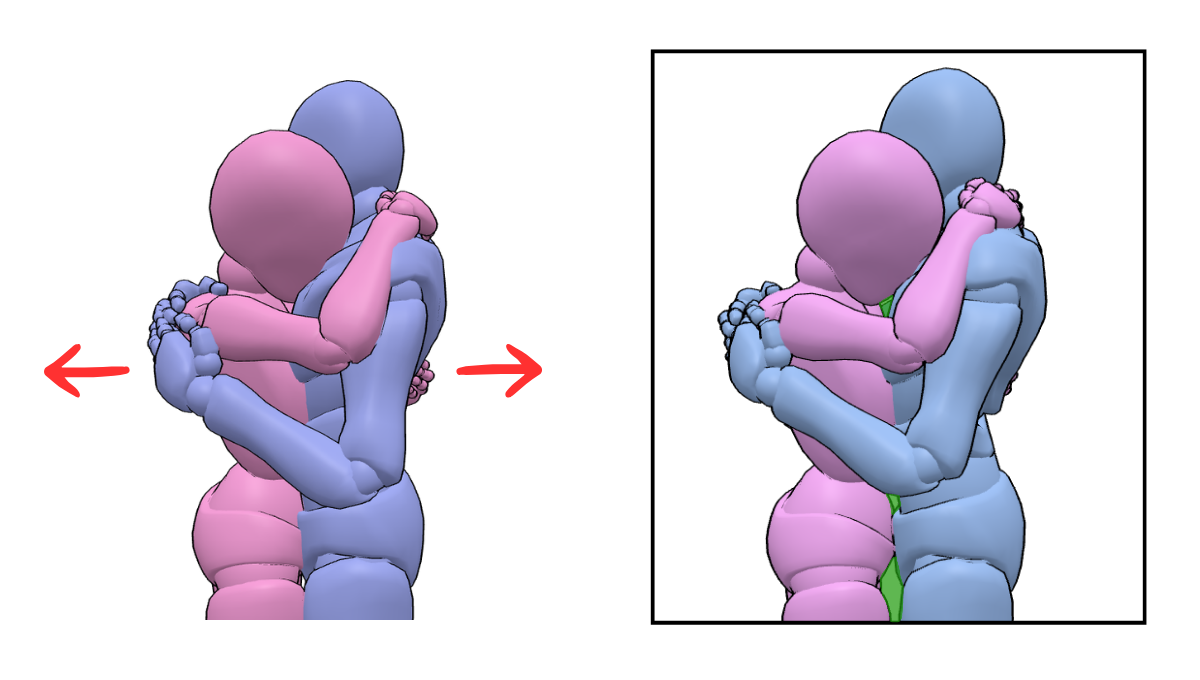
Rotate the Camera
Move around the space to see the embrace from different angles- the back, top-down, or even a bottom-up view to check arm placement and where your models’ hands overlap or hold their partner.
You’ll be able to check on the finer details of the pose as well, if more adjusting needs to be done. Doing this also helps you build an understanding of how bodies interact.
This is all the same pose, but we can see how rotating the camera can give you a lot of different shots that you can draw.
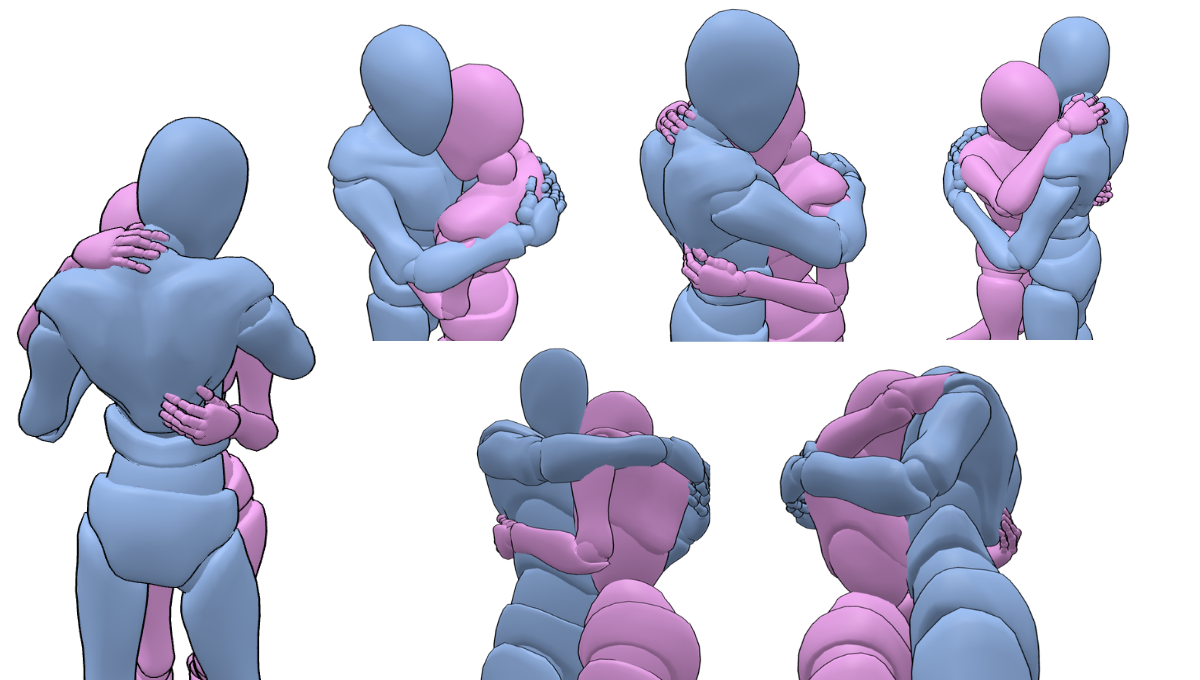
After some practice and study, you can compose a hug pose on your own without getting confused or making more common anatomy mistakes.
Add Props and Accessories
By using 3D props and accessories, you can further study how your characters might sit together, lean against something, or interact with their environment during a hug. Maybe a character’s elbow has to be moved more forward so it doesn’t sink into a wall. That character looks like they have enough space to lean further back.
Don’t Forget the Ground Plane
You don’t want to end up with your characters looking like they’re floating. Be sure to check that your character has their feet firmly on the ground plane. You can move the models up and down on the z-axis to observe how they sink into the ground plane.
Note: You can press G as a shortcut to activate the move tool.
Getting the Interaction Just Right
A premade scene is a great start, but here are some further tips and tricks to get a hug reference as close as possible to what you need.
Premade scenes usually come in a pre-determined or default model. Sometimes, they’re not exactly what you need. You can use the Change Model feature, but other times, it just won’t be enough. Here’s what you can do:
Step 1: Choose and tweak the models you need
Don’t load up a pre-made scene just yet. First, work on your characters or models individually. For this example, let’s try out a male and female character with a larger height difference.
You can tweak the models’ heights with the Scale tool. To mix things up a bit, here we have a taller female and a shorter male. I used the Anime Female and Anime Basic Male models for this.
Step 2: Copy and Paste the Pose
There’s a feature on PoseMyArt that some forget. It’s the Save and Load Pose Tool. The features and choices it reveals when you open it up are a game-changer.
2.1. You can now load up your desired pre-made scene hug pose (models A and B) beside your two properly scaled characters (C and D).
2.2. Select model A to bring up the secondary model menu bar. Click on the Save and Load Pose icon (the one that looks like a kicking person).
2.3. Click on the Copy Pose (And Hand Pose) button.
2.4. Select model C and click on the Save and Load Pose icon again. This time, click on the Paste Pose button to apply the pose you just copied from model A to model C.
2.5. Repeat this process with models B and D and other necessary models.
Step 3: Make the Necessary Adjustments
Of course, the new pose will be “off” because of the height difference. However, it is much easier to adjust than to start from scratch.
Here, I just moved limbs slightly for proper placement to create this hug pose with the taller female and shorter male. You can apply this process to other models and pairs as well.
Level Up Your Workflow
If you create the perfect interaction that you may want to use again, PoseMyArt allows you to save the entire scene to a file. You can even export the whole thing as an .obj file to bring that scene into your favorite 3D modelling software.
It really takes the “grind” out of the sketching phase so you can get to the fun part: fleshing out your character and adding the details.
Final Thoughts
Drawing a believable hug or a close interaction doesn’t have to be a multi-hour struggle with your eraser and imagination. By using PoseMyArt’s 3D references and pre-made scenes, you can skip the technical frustration and focus more on the fun of making your art.
Head over to PoseMyArt and try out a few embraces or side hug scenes for your next romantic or platonic masterpiece!
You can also check out our article on composition to better frame your work.
If you want a jump start on all the tools and features of PoseMyArt, you can also try reading through another article: The Ultimate PoseMyArt Toolkit: Discover Every Feature for Flawless Posing.
Or you can check out our article on drawing more dynamic poses Stop Drawing Statues: A Guide to Mastering Dynamic Poses. You can read all types of articles with guides, and tips and tricks for artists on PoseMyArt’s Blog.